Free resources for creators & educators

Free digital resources.
Templates & printables.
Practical tutorials.

Discover free digital resources, printable templates, editable worksheets, productivity tools and practical tutorials designed to help creators, educators and digital product sellers save time and create better resources.

Practical resources
Free downloads
Helpful tutorials

DigiDown Resources

Simple tools for better work

Digital Template

Weekly Planner

Plan your week. Stay organized.

THIS WEEK

Plan & Prioritize

7 DAYS

M

12

T

13

W

14

T

15

F

16

S

17

S

18

DONE
+
NEXT

READY TO USE

Download & get started

Explore →
🎁

FREE RESOURCE

Download something useful

FREE RESOURCES

Start with something free

Download useful resources and discover what DigiDown has to offer.

View All Freebies
Budget Planner Pro – Free Interactive Budget Tracker & Personal Finance Tool

Planners

Budget Planner Pro – Free Interactive Budget Tracker & Personal Finance Tool

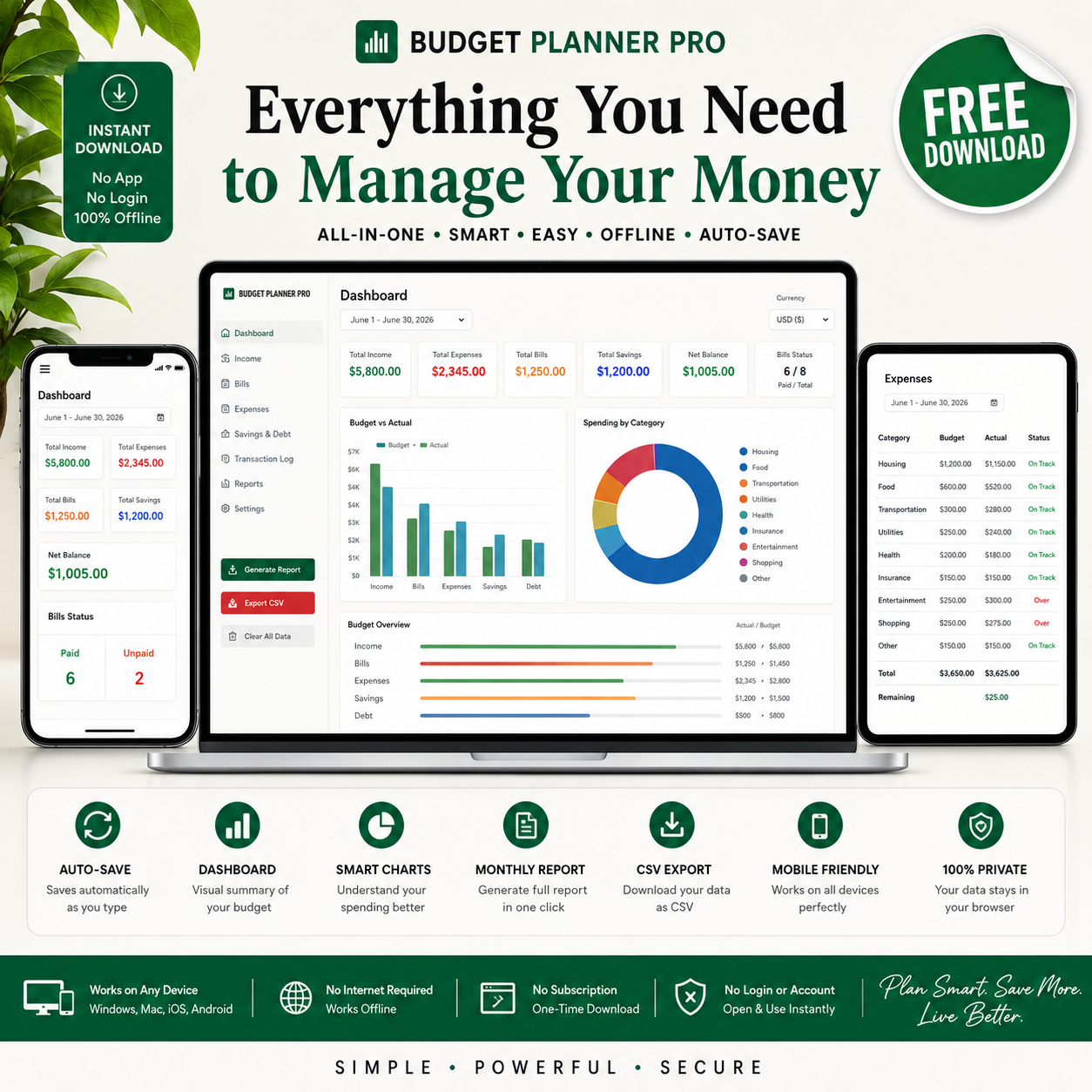
<p>Take control of your monthly finances with <strong>Budget Planner Pro</strong>, a free interactive budget tracker designed to make personal budgeting simple and practical.</p> <p>Unlike traditional spreadsheet templates, this budget planner works as a standalone <strong>HTML file that opens directly in your web browser</strong>. There is no app to install, no subscription, no login, and no Google account required.</p> <p>Simply download the file, open it in your browser, and start entering your income, bills, expenses, savings goals and debt information.</p> <p>Your data is automatically saved in your browser, so you can close the file and continue where you left off later.</p> <p>The planner also includes a dashboard with visual summaries, automatic calculations, budget progress tracking, transaction logging, CSV export and monthly reporting.</p> <p>It works on <strong>Windows, Mac, iPhone, Android, tablets and other devices with a modern web browser.</strong></p> <h2>✨ Key Features</h2> <ul> <li>💾 Automatic data saving</li> <li>📊 Interactive budget dashboard</li> <li>📈 Budget vs. actual tracking</li> <li>🍩 Spending category chart</li> <li>💰 Income tracking</li> <li>🧾 Bill tracking with due dates</li> <li>💳 Expense tracking</li> <li>🎯 Savings goal tracking</li> <li>💸 Debt tracking</li> <li>📝 Transaction log</li> <li>📊 Monthly budget report</li> <li>⬇ CSV export</li> <li>🖨 Print or save reports as PDF</li> <li>📱 Mobile-responsive design</li> <li>🌍 Multiple currency options</li> <li>✏️ Editable categories</li> <li>📶 Works offline after download</li> <li>💻 Works in Chrome, Safari, Firefox and Edge</li> <li>🔒 No account or subscription required</li> </ul> <h2>📦 What's Included</h2> <ul> <li><strong>1 × Budget Planner Pro HTML File</strong></li> <li><code>budget-planner-pro.html</code></li> <li>Interactive Dashboard</li> <li>Income Tracker</li> <li>Bills Tracker</li> <li>Expenses Tracker</li> <li>Savings &amp; Debt Tracker</li> <li>Transaction Log</li> <li>Monthly Report Generator</li> <li>CSV Export</li> <li>Print-to-PDF functionality</li> <li>Quick usage instructions</li> </ul> <h2>👥 Perfect For</h2> <ul> <li>Beginners learning to budget</li> <li>Students</li> <li>Freelancers</li> <li>Entrepreneurs</li> <li>Small business owners</li> <li>Busy professionals</li> <li>Families managing household expenses</li> <li>Anyone working toward savings goals</li> <li>Anyone trying to manage debt</li> </ul> <h2>🚀 How to Use</h2> <ol> <li>Download the free HTML file.</li> <li>Save it to your computer, phone or cloud storage.</li> <li>Open the file in a modern web browser.</li> <li>Select your preferred currency.</li> <li>Enter your budget period.</li> <li>Add your income, bills and expenses.</li> <li>Record transactions as they occur.</li> <li>Review your dashboard and monthly report.</li> <li>Export your data as CSV or print your report as PDF.</li> </ol> <p><strong>No Excel or Google Sheets is required.</strong></p> <h2>❓ FAQ</h2> <h3>Do I need Excel?</h3> <p>No. Budget Planner Pro is an HTML file and works directly in a web browser.</p> <h3>Do I need Google Sheets?</h3> <p>No. You don't need Google Sheets or a Google account.</p> <h3>Does it work offline?</h3> <p>Yes. After downloading the HTML file, it can be used without an internet connection.</p> <h3>Can I use it on my phone?</h3> <p>Yes. The interface is designed to work on desktop, tablet and mobile devices.</p> <h3>Does it save my information?</h3> <p>Yes. Your data is stored in your browser's local storage and can be available when you reopen the file in the same browser.</p> <h3>Can I export my budget?</h3> <p>Yes. The planner includes CSV export functionality.</p> <h3>Can I create a monthly report?</h3> <p>Yes. Use the built-in report function to generate a summary of your budget.</p> <h3>Is there a subscription?</h3> <p>No. There is no subscription or monthly fee.</p> <h2>📌 Important</h2> <ul> <li>Digital download only</li> <li>No physical product will be shipped</li> <li>No Excel or Google Sheets required</li> <li>Data is stored locally in your browser</li> <li>Clearing your browser's site/local storage may remove saved data</li> <li>For personal budgeting and financial organization purposes</li> <li>Personal use only</li> <li>Not financial, investment, tax or professional financial advice</li> <li>Not for resale or redistribution</li> </ul>

Download Free →

PREMIUM PRODUCTS

Products that save you time

Ready-to-use digital resources designed with simplicity and usability in mind.

View Shop

GET FREE RESOURCES

Get useful resources in your inbox.

Join our email list and get new freebies, useful tutorials, and digital product resources.

No spam. Unsubscribe anytime.

FROM THE BLOG

Ideas, guides & inspiration

Helpful articles to help you create, design and sell digital resources.

View All Posts