Tutorials
How to Deliver a Digital Download on Gumroad & Etsy
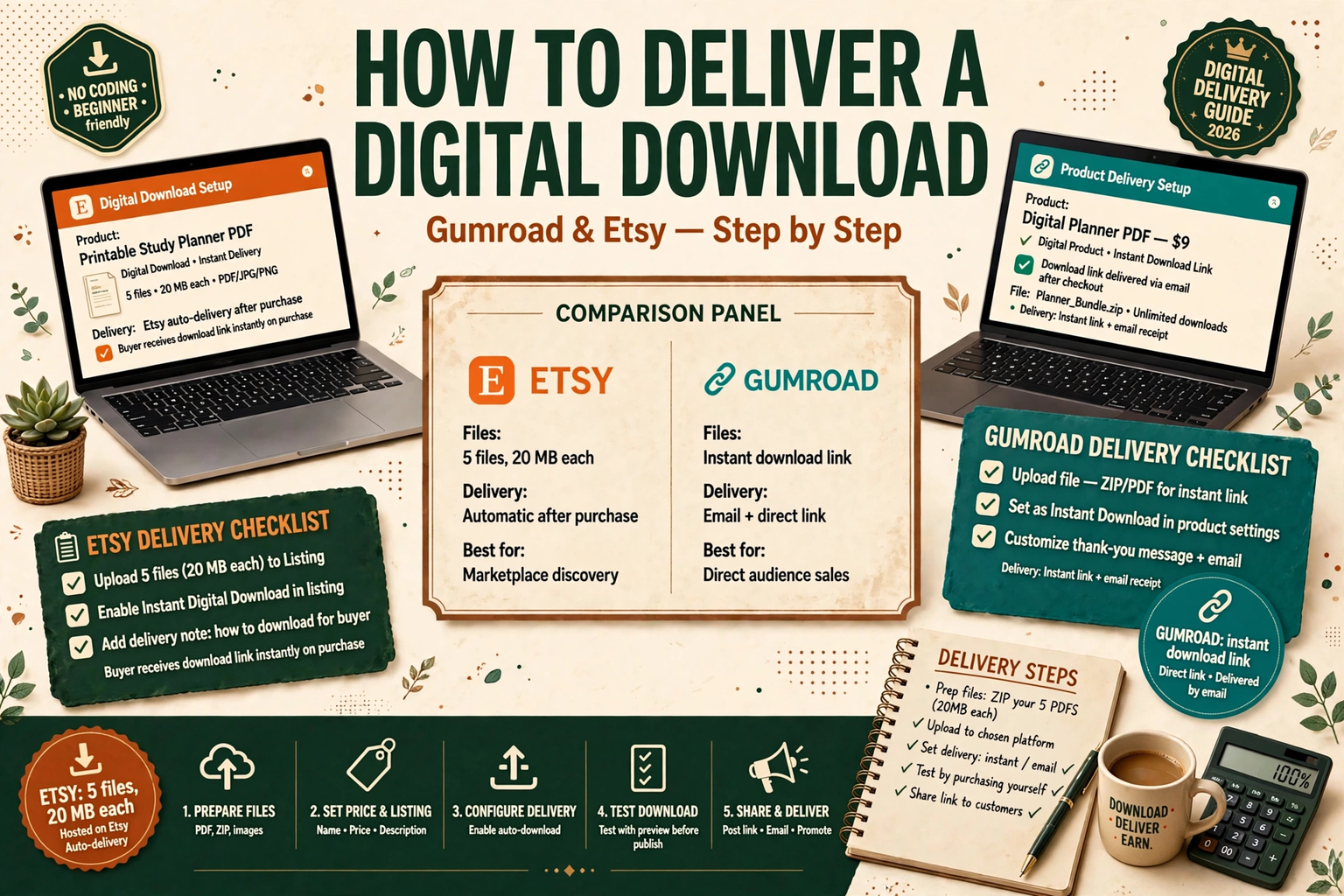
Learn how to deliver a digital download on Gumroad and Etsy, step by step — prepare your files, set up instant delivery, test the buyer journey, and fix the delivery problems beginners hit most.
Selling a digital product is only half the job. The other half is getting the file into your buyer's hands without a confused message, a failed download, or a refund request. The good news is that neither Etsy nor Gumroad makes you email files by hand. Both platforms deliver the download automatically the moment a buyer pays — but only if you set the listing up correctly.
This tutorial walks through the whole process: preparing your files, setting up instant delivery on Etsy and on Gumroad, testing the buyer journey before you publish, and fixing the seven delivery problems beginners hit most. No paid tools are needed for any of it.
How delivery works: Etsy vs Gumroad at a glance
The two platforms deliver in different ways, and the difference decides how you package your product.
| Etsy | Gumroad | |
|---|---|---|
| Delivery | Instant download after payment | Download link by email + buyer library |
| Files per listing | Up to 5 files, 20 MB each | Much larger files accepted |
| File types | PDF, PNG, JPG, ZIP and others; SVG and PSD must go inside a ZIP | Almost any file type |
| Buyer needs | Etsy account; downloads work in a browser, not the Etsy app | Email address; no account needed to buy |
| Fee on a sale | $0.20 listing fee + 6.5% transaction fee + payment processing | Flat 10% per sale, plus standard card processing |
| Best for | Buyers searching a marketplace | Selling direct to your own audience |
The practical takeaway: Etsy is stricter about file size and format, so your packaging matters more there. Gumroad is more forgiving on files but gives you no built-in traffic — buyers arrive through your own links. If you are still choosing between the two, our comparison of Etsy vs Gumroad vs Stan Store breaks down fees, traffic, and which platform fits a beginner.
Step 1: Prepare your files before you upload anything
Do this work once, before you touch either platform. Fixing files after a listing is live means re-uploading, re-testing, and sometimes messaging buyers who already downloaded the old version.
Choose the right format
Match the format to what the buyer will actually do with the file:
- PDF for printables, planners, worksheets, and ebooks. It prints the same everywhere and opens on every device.
- PNG or JPG for wall art, social media templates, and anything the buyer prints at a specific size. Export printables at 300 DPI so they look sharp on paper.
- ZIP for anything with more than one file, and for formats a platform does not accept directly — SVG, PSD, and Canva template links all travel inside a ZIP on Etsy.
- Spreadsheet files (XLSX or Google Sheets link) for budget trackers and calculators. Include a short PDF that explains how to open and use the sheet.
One rule covers all of it: deliver the finished product, not your working files. A buyer should never have to open Canva, install a font, or guess which file is the real product.
Name files like a human will read them
Your buyer sees your filenames — on Etsy they appear exactly as you upload them. Use clear, short names with no spaces or special characters:
- Good:
budget-planner-2026-a4.pdf,weekly-planner-printable.zip - Bad:
FINAL_v7 (2) copy.pdf,Untitled design (12).pdf
Keep filenames under 70 characters (Etsy rejects longer ones) and use letters, numbers, hyphens, and underscores only. If you sell a bundle, name the files in the order the buyer should use them, starting with a START-HERE or README file.
ZIP your bundle the right way
If your product has more than a couple of files, ZIP them into one clean package:
- Create one folder with your product name.
- Inside it, put a
START-HERE.pdf(or a shortREADME.txt) that says what is inside and how to use it. - Add your product files, grouped into clearly named subfolders if there are many — for example,
A4,US-Letter, andInstructions. - Compress the folder into a ZIP and check its size. On Etsy, the ZIP still has to be under 20 MB, so compress images first if it is too large.
Then open the ZIP yourself and check that everything inside opens cleanly. A corrupted ZIP is the single most common reason a buyer messages you, and it takes two minutes to prevent.
Step 2: Deliver a digital download on Etsy
Etsy delivers digital products as instant downloads. The buyer pays, Etsy marks the order complete, and the download links appear in the buyer's account and in their confirmation email. You do nothing per order — but the setup has to be exact.
- Create a digital listing. In your shop manager, choose Add a listing, then select Digital as the item type. A digital listing cannot be changed to a physical one later, so get this right at the start.
- Upload your files. Add up to 5 files, each no larger than 20 MB. If you have more than 5 files, or any file over 20 MB, ZIP them first (the ZIP counts as one file and still has to be under 20 MB).
- Fill in the listing properly. Write a title with the words buyers search for, use all 13 tags, and say plainly in the description what the buyer receives: file format, page count or sizes, and what they need to use it (a printer, a PDF reader, a free Canva account). State clearly that this is a digital download and nothing will be posted.
- Add listing images that show the product in use. Buyers cannot hold a file, so your images are the product. Show the planner on a tablet, the printable on a desk, the template filled in — not just a flat screenshot. Our free tutorial on creating mockups for Etsy listings in Canva shows how to do this without paid software.
- Set the price and publish. Check the fee maths before you publish: $0.20 to list, 6.5% of the sale price when it sells, plus payment processing. Our guide on how to price digital products walks through fees, pricing psychology, and bundles in detail.
- Check the download yourself. After publishing, open the listing as a buyer would and confirm the download links are attached. Etsy will not let you publish a digital listing with no file attached, but it will not check that the file is the right one — that is your job.
One Etsy quirk to warn buyers about in your listing: digital files cannot be downloaded in the Etsy app. Buyers need to open Etsy in a web browser to get their files. Saying this in the description prevents a large share of "I can't download it" messages.
Step 3: Deliver a digital download on Gumroad
Gumroad's delivery is simpler to set up and more forgiving on file size. The trade-off is that there is no marketplace traffic — buyers come from links you share.
- Create a product. From your Gumroad dashboard, choose New product, give it a name, and set a price (or $0+ for pay-what-you-want, or $0 for a free product).
- Upload your files. Add your product files — PDF, ZIP, video, audio, or almost anything else. Gumroad accepts much larger files than Etsy's 20 MB cap, so a big bundle that would need splitting on Etsy can usually go up as a single file here.
- Write the product page. Gumroad pages are short by design: a clear headline, one or two sentences on what the buyer gets, and a preview image or video. List exactly what is included, the format, and the size, just as you would on Etsy.
- Set the file as the deliverable, not an attachment. This is the step beginners miss: the files you upload in the product editor are what the buyer receives. Do not put your product in the description as a link — the description is for selling, the upload field is for delivery.
- Add versions if you sell variations. If you offer the same planner in A4 and US Letter, or with and without hyperlinks, use Gumroad's versions feature so buyers pick the right one at checkout instead of emailing you afterwards.
- Publish and test the link. Open your public product URL, buy it yourself with a test purchase (or use Gumroad's preview), and confirm the download link arrives by email and opens correctly. Gumroad also gives buyers a permanent library page where they can re-download, so a lost email is not a lost product.
Gumroad charges a flat 10% fee on every sale, plus standard card-processing charges, with no monthly fee and no listing fee. Sales that come through Gumroad Discover — where a buyer finds you by browsing Gumroad rather than clicking your link — are charged at 30% instead, so most beginners earn almost all their sales at the 10% rate.
Step 4: Test the full buyer journey before you publish
This step takes ten minutes and prevents most of the messages that make new sellers panic. Do it on both platforms, every time you launch a new product.
- Buy your own product. On Etsy, buy from a second account or ask a friend to buy it and refund them. On Gumroad, use a test purchase. Never skip this — a listing that looks right in the editor can still deliver the wrong file.
- Download on a phone and on a computer. Open the download link on both. Check that the PDF opens, the ZIP unzips, and the pages print at the right size. Most buyers are on their phones when they buy, and a file that only works on a desktop is a refund waiting to happen.
- Follow your own instructions. Open the START-HERE file and do exactly what it says, as a stranger would. If any step is unclear, rewrite it now.
- Check the email. Confirm the buyer receives a clear confirmation email with a working download link. If the email lands in spam, that is a platform deliverability issue you cannot fix — but you can tell buyers in the listing to check their spam folder.
If anything fails, fix it before the listing goes live. A product with zero sales and a broken download is a much easier fix than a product with ten buyers already holding the wrong file.
What your buyer actually sees after paying
Knowing the buyer's side helps you write a better listing and answer support messages faster.
On Etsy, the buyer gets an order confirmation email with download links, and the files also appear under Purchases and reviews in their Etsy account. The order is marked complete automatically. If the buyer bought on the Etsy app, they will see a message telling them to open Etsy in a browser to download — which is why your listing should say this in advance.
On Gumroad, the buyer gets an email with a download link and a receipt, and the product is saved to their Gumroad library if they create an account. They can re-download from the library any time, and if you upload a new version of the file, Gumroad can notify past buyers — a useful way to deliver free updates.
7 delivery problems beginners hit (and the fix for each)
| Problem | Why it happens | The fix |
|---|---|---|
| File too large to upload | Etsy caps each file at 20 MB | Compress images, export PDFs at a lower resolution, or split the bundle into a ZIP under 20 MB |
| Buyer cannot find the download | They are looking in the Etsy app, or in spam | Tell them to open Etsy in a browser, go to Purchases and reviews, and check spam for the confirmation email |
| ZIP will not open | Corrupted upload or an old unzip tool | Re-upload a fresh ZIP, and include a note telling buyers to use a free tool such as 7-Zip |
| Wrong file delivered | An old draft was uploaded by mistake | Re-upload the correct file, message affected buyers with the new link, and re-test the listing |
| Buyer wants a different size | Only one size was included | Offer both A4 and US Letter in the same bundle, or use Gumroad versions |
| "This is not what I expected" | The listing did not say what the file is | Rewrite the description: format, size, page count, and what the buyer needs to use it |
| Refund request after download | Buyer changed their mind, or the file disappointed | State your refund policy in the listing; for genuine delivery failures, fix the file first, then refund if the buyer still cannot use it |
Most of these are packaging problems, not platform problems. A clear description, a tested ZIP, and a START-HERE file prevent the majority of them.
After the sale: updates, refunds and support
Delivery does not end at the download. Three habits keep buyers happy and keep support messages short.
Update the file, not the listing. When you improve a product — fix a typo, add a page, refresh a design — upload the new file to the existing listing. Do not create a new listing for the same product; you would split your reviews and your search ranking. On Gumroad, past buyers can be notified of the new version. On Etsy, message past buyers only if the update fixes something that was actually broken.
Answer download questions with the same short reply. Save a template: where to find the download (browser, not the app), how to unzip the file, and what to do if the link has expired. Most buyers are not angry — they are stuck — and a fast, specific answer turns a one-star risk into a repeat customer.
Decide your refund policy before your first sale. Digital products cannot be returned, and both platforms let you set your own policy. A clear, fair rule — refunds for files that genuinely do not work, no refunds for change of mind — written in the listing, protects you and sets the buyer's expectations honestly.
FAQ
Can I sell the same digital product on both Etsy and Gumroad?
Yes. There is no exclusivity on either platform. Many sellers list on Etsy for its built-in search traffic and on Gumroad for direct sales to their own audience, with the same files on both. Keep the price consistent so buyers do not feel cheated for finding it cheaper elsewhere.
Do I have to email the file to the buyer myself?
No. Both platforms deliver automatically after payment. You should only email a file manually if the platform delivery has genuinely failed — for example, a buyer who cannot access their Etsy account. In that case, send it once, then fix the listing so the next buyer does not have the same problem.
What happens if my file is bigger than 20 MB on Etsy?
Compress it or split it. Export images at a lower resolution, reduce the PDF size, or split a large bundle into two ZIP files under 20 MB each (you have 5 file slots). If the product is genuinely too large for Etsy — a video course, for example — sell it on Gumroad or your own site instead, and use Etsy for the smaller products.
Can buyers re-download a file they bought?
Yes, on both platforms. On Etsy, the files stay in the buyer's Purchases and reviews. On Gumroad, they stay in the buyer's library. This is another reason to keep your listing live and your files up to date — past buyers come back for the new version.
How do I deliver a Canva template?
You cannot upload a Canva file directly to either platform. Export it as a PDF for printables, or deliver a PDF that contains the Canva template link with instructions on how to open and copy it. Tell buyers clearly in the listing that they need a free Canva account. Our tutorial on how to create a digital product in Canva, start to finish covers the full build process.
Related Reading
- Etsy vs Gumroad vs Stan Store: Where Should a Beginner Sell? — fees, traffic, and which platform fits a beginner.
- How to Create a Digital Product in Canva, Start to Finish — build the product before you deliver it.
- How to Create Mockups for Etsy Listings in Canva (Free) — listing images that show the product in use.
- How to Price Digital Products — fees, pricing psychology, and bundles.